
Hello Folks,
Deploying a Next.js app with Sitecore CDP on Vercel can be a smooth process, but like any deployment, it can come with its share of challenges. I recently navigated through some common issues and found effective solutions that can help anyone facing similar roadblocks. In this blog, I’ll share my journey, the problems I encountered, and the steps I took to resolve them, ensuring a seamless deployment. Whether you’re new to Sitecore CDP, Next.js, or Vercel, these insights will help you troubleshoot and streamline your own deployments.
If you want to Start learning about Sitecore CDP with next js you can follow my blogs here
I have followed this URL for setting up my Next.js app through GitHub in Vercel.
Error: [IE-0001]
When I deployed the code on Vercel, it returned a 500 Internal Server Error.

After checking the logs in Vercel, I discovered that there is an error related to the “window” object.
Unhandled Rejection: Error: [IE-0001] The "window" object is not available on the server side. Use the "window" object only on the client side, and in the correct execution context.
    at init (file:///var/task/node_modules/@sitecore/engage/esm/src/lib/browser/initializer.mjs:25:15)
    at loadEngage (/var/task/.next/server/pages/index.js:22:74)
    at /var/task/.next/server/pages/index.js:34:1
Node.js process exited with exit status: 128. The logs above can help with debugging the issue.
when i checked on google i find out that this is common error while deploying on Vercel . It is mentioned in Sitecore troubleshooting also.
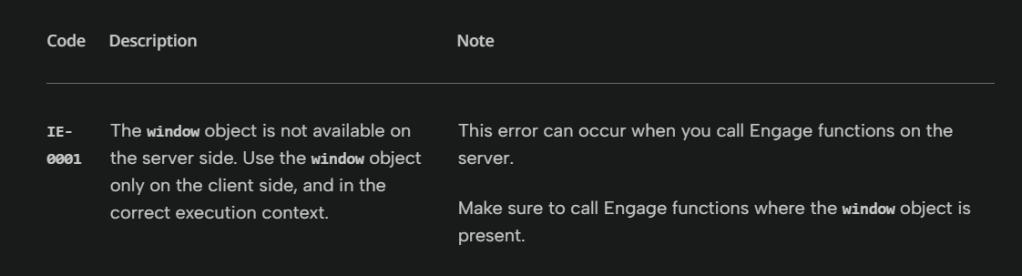
But the question I had is: while calling the engage function, there is no window object. So why is this error occurring?
While searching, I found a blog that mentioned the issue occurred because window is a browser-specific object. Typically, the window object is available in web browser environments but not in server-side or non-browser environments.
So i have implanted it adding this code
if (typeof window !== "undefined") {
  // Initialize Engage SDK here
  loadEngage();
}
This will resolve the error, and you can use the above code when you are using the window object
But as it is said, resolving one error often leads to encountering another. So, let’s move on to the next error.
Error 504 : Gateway timeout
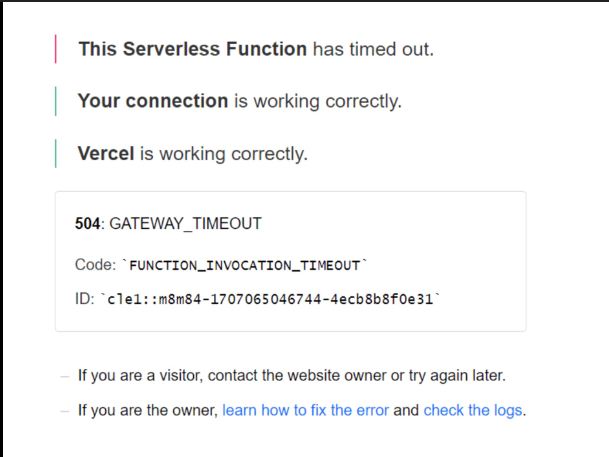
After resolving the window object error, I encountered a 504 Gateway Timeout error on the homepage.
When I checked the logs, I discovered that I was using a serverless function that was timing out because Vercel has a default timeout value of 10 seconds.
I searched and found in Vercel’s documentation that there are options to increase those timeout values.
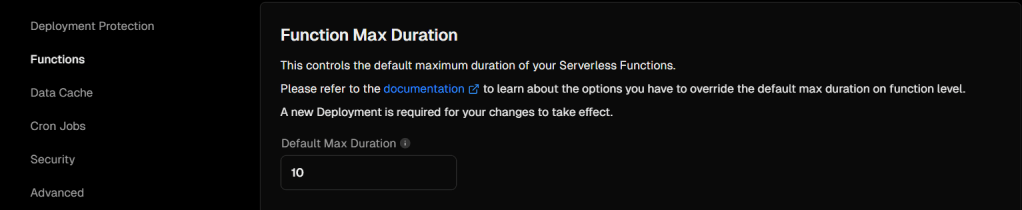
same option is added in this answer also Stackoverflow
{
  "functions": {
    "app/api/**/*": {
      "maxDuration": 5
    }
  }
}
I created a file named vercel.json, added the above configuration to it, and deployed it to Vercel. After this, my site was up and running.
Next Auth Session
I am using NextAuth in my application, and for getting the session, I was using the getSession function.
This function was working well with GET methods but was returning a 400 error when used with POST or PUT methods.
As I am new to Next.js and Vercel technology, I googled this function and found some details.
This function was working perfectly in my Local but not working on server
I found a GitHub discussion where others were facing the same issue as mine. From there, I learned that the getSession function is not working on the server side for POST/PUT methods.
For server side session we need to use getServerSession function and that will resolve issue
I referred to the Next.js documentation for this function and implemented it.
It started working same as Local (everything works PERFECT in local😁 )
Conclusion
In conclusion, deploying a Next.js app with Sitecore CDP on Vercel is not just about addressing errors but understanding the intricacies of each technology’s interaction. By documenting and sharing these solutions, I hope to empower others to streamline their deployment processes and focus more on building robust applications.
For more insights and detailed steps on these solutions, feel free to explore my previous posts and resources. Thank you for joining me on this deployment journey!
Happy Coding 😊






 Tech Nerd
Leave a comment