Hello Folks ,
Whenever we create a website, one of the most important aspects is designing a solid architecture. In today’s world, we are increasingly moving towards Sitecore headless architecture for websites. Sitecore offers a headless architecture with several benefits, one of which is the concept of partial design.
Let’s understand what is partial design how it works in headless architecture and what are benefits of that
Partial Design
A partial design in Sitecore is a reusable layout template. It defines the structure and presentation for specific sections of a page. It allows developers to standardize components and streamline page design while maintaining flexibility across multiple pages.
Partial designs is there under your site -> Presentation -> Partial Designs
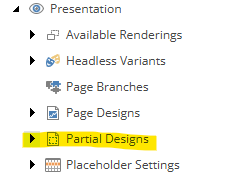
In headless development, partial designs work based on their signature, which links them to the placeholder they are associated with.
In simple terms, partial designs rely on two key elements: Signature and Placeholder. These two work together to connect the partial design with your layout service.
Create Partial Design
A good practice for creating partial designs is to organize them in a folder. This helps keep a clean and structured architecture, especially when you have many partial designs and sections

A partial design has two main fields: Base Partial Design and Signature.
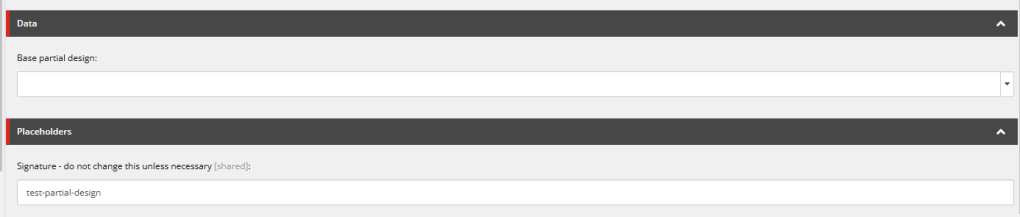
- Base Partial Design : A base partial design in Sitecore is a basic layout. It includes common elements like the header or footer. It can be used as a starting point for building different pages. This approach makes it easier to maintain consistency across the website.
- Signature : The Signature is a unique identifier for each partial design. As shown in the picture, a partial design creation automatically adds its signature. The signature has the same name as the partial design.
Now, let’s understand how this connects.
Placeholder for Partial
When we create a partial design it will also create a placeholder setting in your site -> Presentation -> Placeholder Setting -> Partial Design
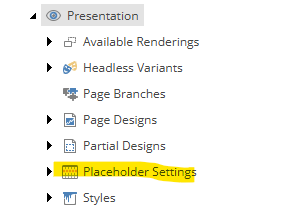
In placeholder settings it will automatically add placeholder key when we create partial
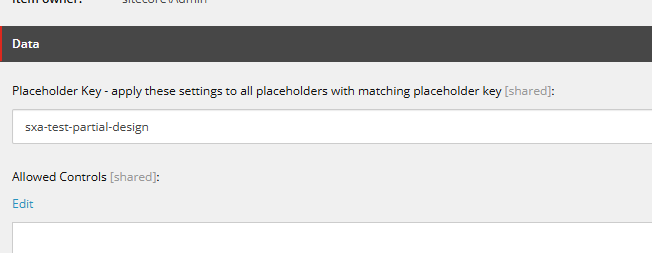
If you look closely, the Signature and Placeholder key are the same, with just “sxa” added in the placeholder key. The system automatically creates this connection when the partial design is first created. This ensures that the signature is linked to the right placeholder in the system.
Tips
The suggested best practice is to avoid copying partial designs. If you copy a partial design, the Signature will be the same, which can cause issues. Instead, it’s better to create a new partial design from scratch to ensure a unique structure and proper connection.
If you’re having trouble seeing your partial design and placeholder, make sure that the Signature and Placeholder are correctly set. Double-check that they match to ensure everything is properly linked.
Conclusion
In conclusion, partial design in Sitecore plays a crucial role in headless architecture. It provides a structured, reusable layout. This layout ensures consistency across multiple pages.
Sitecore leverages elements like the Base Partial Design and Signature. This approach allows developers to maintain flexibility. It also ensures adherence to a standardized design.
Proper organization is crucial. Following best practices like avoiding the copying of partial designs ensures smooth integration. This approach prevents potential issues with signatures and placeholders.
With these principles in mind, headless development becomes more efficient, maintainable, and scalable, enabling developers to build robust, dynamic websites.
Happy coding 😊.





 Tech Nerd
Leave a comment