
Hello Folks ,
Some issues have solutions, but tracing them can take a lot of time. Recently, we found a solution to one such issue, and I’ll be discussing it in this blog.
Issue
Let’s understand issue and then we look into tracing .
Sitecore has different types of roles for managing content in CMS , you can read more about that here .
We have used AUTHOR role for managing content item and applied some condition on that according to our requirement .
We have applied only read action on our partial and page design , only items under DATA is editable .
So when ever we are saving any data it was giving runtime error
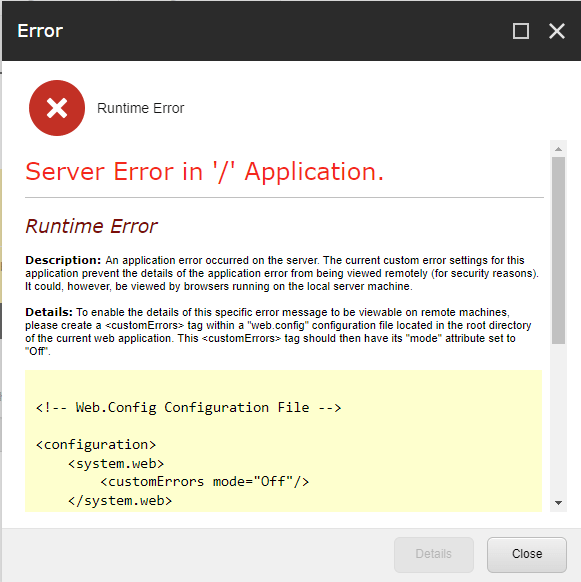
As we encountered this error in the DEV environment, we couldn’t identify the exact cause. To get more insights for debugging, we attempted to reproduce the error locally.
Issue Tracing
When we tried to save data locally, we encountered the same issue. Here’s what the error looked like.
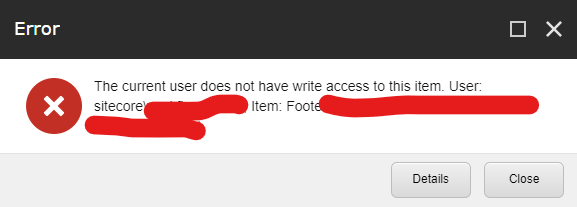
We then began breaking down the issue into several parts. Not all data sources were affected by this issue—only some data sources with the same template experienced it.
We discovered that even though the templates were the same, some data sources did not have this issue.
We looked for what was common in all the data sources with the error. We found that they were all used in a partial design.
We had only set READ access on the partial design, so it couldn’t write. Once we removed the data source from the partial design, it started working correctly without any issues
When we clicked the save button, it first called the save pipeline. Then, it tried to write to the partial design as well. At that point, an error would occur, but the save would still complete successfully. But as it was giving error so we thought it was due to partial design .
Solution
As we discussed, the issue was due to the partial design. So, we decided to add WRITE access to the partial design, and—bang! The issue was resolved, and everything started working.
Sometimes solution is simple but tracing this issue take much time .
Conclusion
In conclusion, this issue shows that sometimes the solution is simple, but finding the cause can take time.
We carefully checked everything. We focused on access settings. We figured out that the problem was caused by not having WRITE access on the partial design.
Once we added the correct access, everything worked as expected. This experience reminds us how important it is to carefully troubleshoot and test when dealing with complex systems like Sitecore.
Last but not the least thank you Akshay Barve for helping me to troubleshoot this issue
I hope this helps you solve similar issues faster and with less frustration.
Happy coding 😊.





 Tech Nerd
Leave a comment