
Hello Folks,
Recently, I had a requirement in my project where I needed to have a Sitecore user from the production environment in my local setup.
For that, I created a package of the user from my production environment.
Create a Package
- Open package designer from desktop
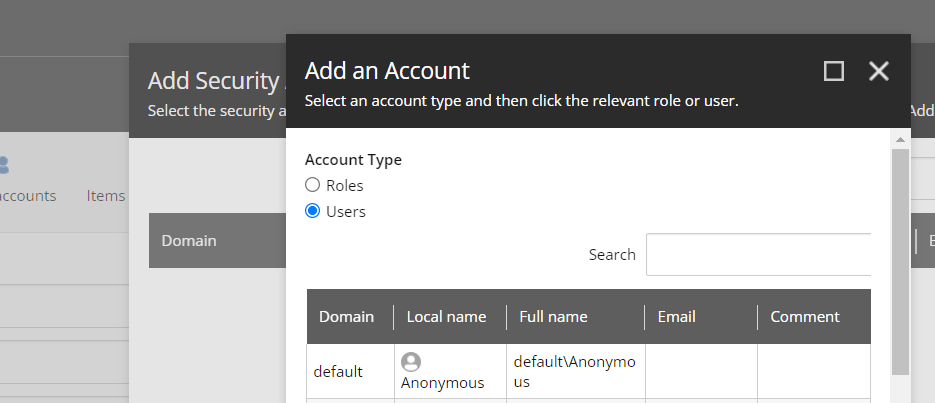
- Click on security accounts
- Click on ADD button and select user which you want to package
- Click on Generate ZIP and you can download zip from there
Install a Package
- Open install wizard in desktop
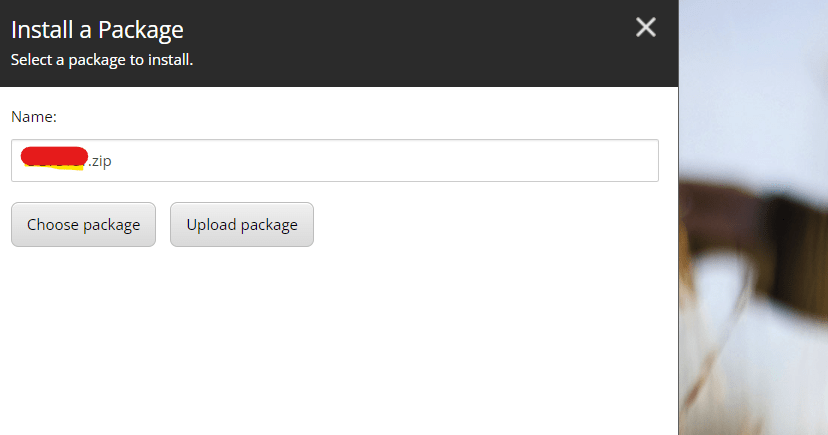
- Click on upload package and upload package which you have downloaded
- Click on Next and then Install , this will add user in your Local setup
Enable User
After this step, I tried to log in to my CMS with this user, but it gave me an error stating that the ID/password was incorrect.
I tried 2-3 times, but the same error persisted. I searched for information but couldn’t find anything concrete.
Then I reached out to one of my seniors, and he advised me to check the user in the User Manager within the CMS .
There, I found that the user I had migrated was disabled.

I selected the user and clicked on the ‘Enable’ button. This action enabled the user, and I was then able to log in to the CMS.
Conclusion
Migrating users between Sitecore environments can seem straightforward, but there are always nuances to watch out for, as I discovered in this case.
While packaging and installing a user is a simple process, enabling the user is a crucial step that’s easy to overlook but essential for successful login.
I hope this guide helps you avoid the same pitfalls and ensures a smoother experience when working with user accounts across different Sitecore environments.
Remember, a quick check in the User Manager could save you a lot of troubleshooting time.
One of the reasons I wrote this blog is that while many people know this trick, it isn’t documented clearly or concretely anywhere. If it is mentioned, it’s not directly addressed. This will be helpful for anyone who is new to Sitecore technology.
Happy Coding 😊






 Tech Nerd
Leave a comment