
Hello Folks ,
Sitecore CLI
Sitecore CLI is one of the important part of Sitecore system . It is useful for syncing items between various environments.
For more information about Sitecore CLI you can read here
In our project we are using Sitecore for Visual studio for syncing item in local system . you can download that from here
Recently we faced one issue while syncing item to upper environment from Sitecore for Visual studio .
Let’s discuss that issue and then what is solution for that .
Issue
we are syncing around 25- 30 items that means there are around 430 objects in a single commit . while committing there is no issue and it created a local commit but when we try to push that to upper environment it was giving error .
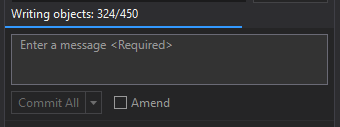
It got stucked on around 400 object and then it stuck for 1 to 2 minute and then it was giving an error .

Issue Trace
We start tracing the issue that what can be the reason . I was working on old branch so we thought there can be a conflict in old branch so we decided to create a new fresh branch and tried same step and still getting an error.
Then we thought it might happen there is any corrupt item in this bunch so it was giving an error so we checked all items and we didn’t find any issue in any of the item .
Solution
We decided to break this large chunks into small chunks and pushed them to upper environment and surprisingly it worked without giving an error . All items got pushed to upper environment without any error .
We thought this can be error with limits of items you can sync in CLI but we decided to dig further in this issue because we didn’t find any limits for items for CLI.
So we decided to go in another direction that is way of pushing items to upper environments . we are using azure and using git methods to push items so we checked logs of gits output windows . You can check GIT logs from visual studio by selecting Source Control option from dropdown in output section .
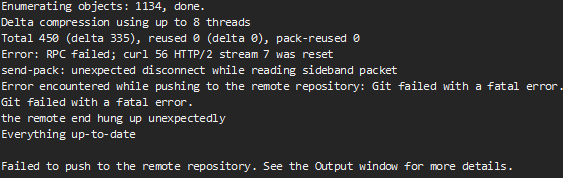
Enumerating objects: 764, done.
Delta compression using up to 8 threads
Total 430 (delta 320), reused 0 (delta 0), pack-reused 0
Error: RPC failed; curl 56 HTTP/2 stream 7 was reset
send-pack: unexpected disconnect while reading sideband packet
Error encountered while pushing to the remote repository: Git failed with a fatal error.
Git failed with a fatal error.
the remote end hung up unexpectedly
Everything up-to-date
Failed to push to the remote repository. See the Output window for more details.
We get this error in git output and searched about that . On searching we found that this issue is related to buffer space in git and due to it it was giving an unexpected disconnect from remote repository .
we found this very nice article where we found the main reason for this issue and it can be happen with any git related repository .
Conclusion
In this case, the issue stemmed from Git’s buffer space, which caused a disconnect when pushing a large number of items through Sitecore CLI.
By breaking down the push into smaller batches, we were able to work around the problem.
It’s important to always consider the underlying systems like Git when troubleshooting Sitecore CLI issues, as they can often be the source of unexpected errors.
Additionally, keeping an eye on Git logs can provide valuable insights to resolve such conflicts quickly.
We hope this helps others who may face a similar issue while syncing items between environments.
Last but not the least thank you Akshay Barve for helping me to troubleshoot this issue
Happy coding 😊.






 Tech Nerd
Leave a comment