
Hello Folks ,
As we are moving towards more headless technology, Sitecore supports Docker Desktop for virtualization, offering more space and speed.
Currently, while using Docker, I have encountered one issue. Let’s delve into that issue and then we’ll explore the solution.
While using Docker, my system initiated an auto-update, causing Docker to stop unexpectedly. When I tried to restart Docker, it displayed an error.
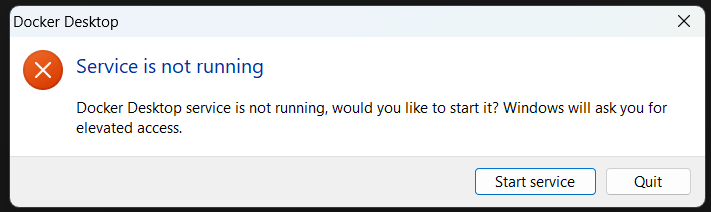
This error occurred whenever I attempted to start Docker Desktop. I also tried opening it with administrator access, but the issue persisted.
I was unable to run the .ps file to shut down the Docker service that was running before Docker stopped unexpectedly.
Now that we understand the issue, let’s explore the solution.
Solution
Since this issue concerns services, let’s first check if any services are currently running.
For that go to task manager and search “docker” for refence see image below
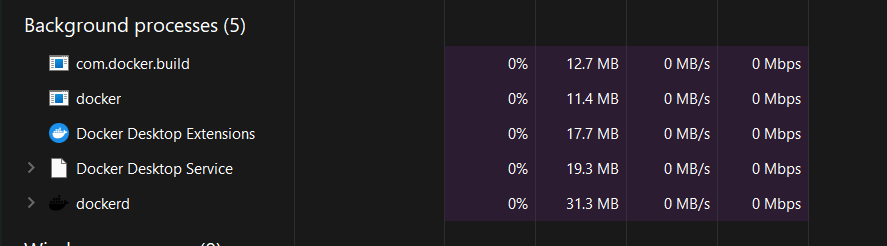
As you can see in the picture, there are many services running in the background. Let’s stop these services/tasks and then try running Docker again. In some cases, you may also need to restart your system.
This will start Docker running again, allowing you to execute your .ps file as needed.
This solution will resolve the issue, but you may encounter it again if you restart or shut down your system. To prevent this error from recurring, follow these basic steps:
Go to your Task Manager, navigate to the ‘Startup’ tab, and disable the Docker app. This will prevent the service from automatically starting.
Whenever you restart or shut down your system, make sure to stop your containers by running the ‘stop.ps’ file. This ensures that when your system restarts, it will run a new service and the issue will not recur.
By following these steps, you can effectively manage Docker services on your system and mitigate potential startup errors in the future.
Keep coding 😊





 Tech Nerd
Leave a comment